Logic Made Visible
Seeing criteria as a graph made it easier to follow which filters applied first and how inclusion and exclusion logic was organized across the cohort definition.
An interactive visual analytics system for constructing, inspecting, and comparing EHR cohorts through AI-assisted SQL generation and coordinated views.
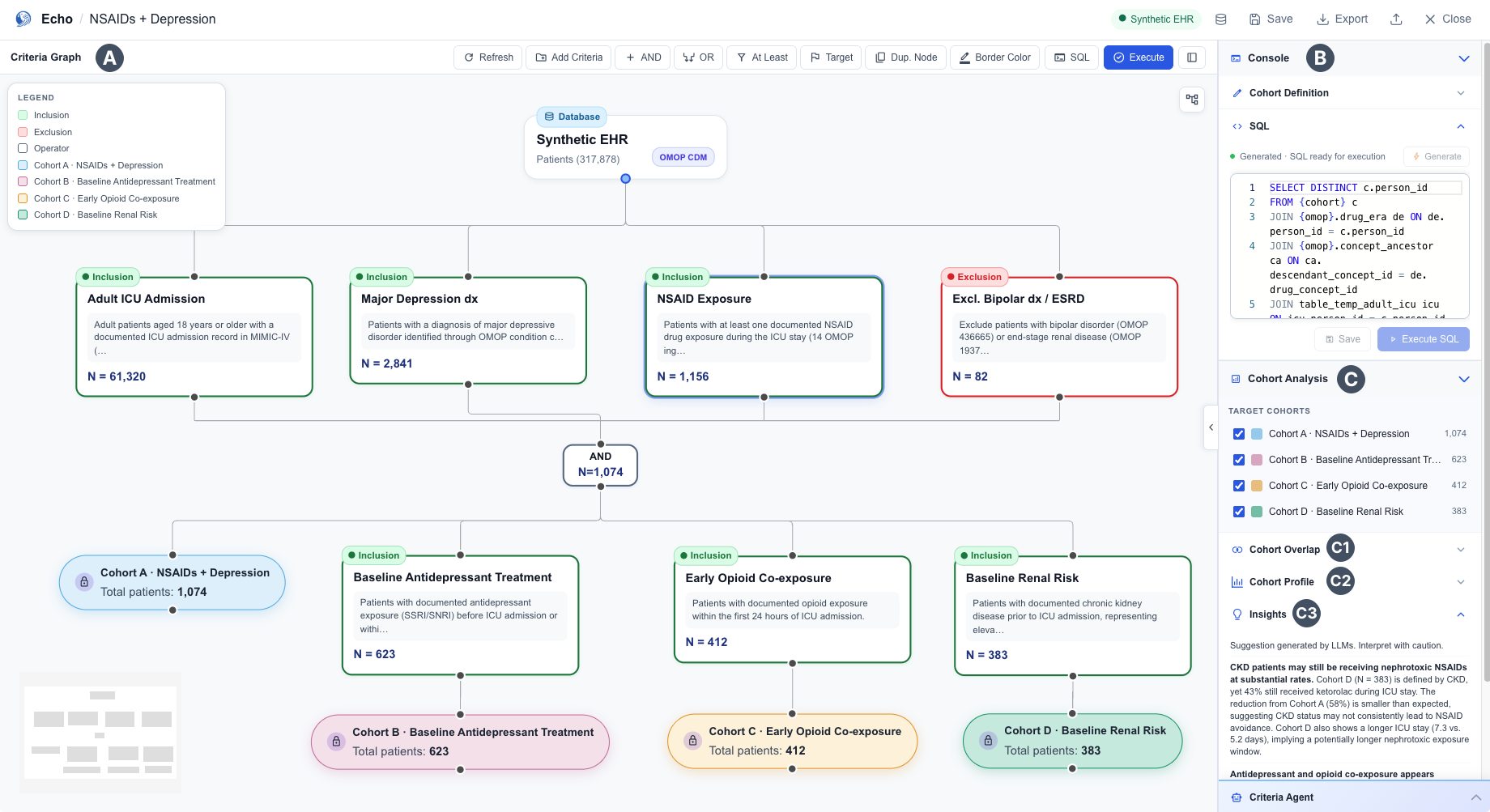
Echo is a visual analytics system that lets clinical researchers manage cohort definitions on an interactive Criteria Graph, inspect and edit AI-generated SQL at the criterion level, and compare alternative cohort definitions side by side through coordinated views. It integrates a Text-to-SQL agent into the authoring workflow so researchers can focus on short natural-language descriptions for each criterion rather than writing SQL directly.
I translated clinical cohort logic into an editable graph, defined the inclusion and exclusion visual language, designed how four coordinated views update together, and implemented the production frontend in Vue.js and Vue Flow.
Led formative discussions with clinical informatics experts to understand how researchers think about cohort construction, which directly shaped the three design objectives and the four visualization tasks.
Designed the DAG representation from scratch: node types, inclusion vs. exclusion color logic, N-count propagation at each edge, branching from shared upstream criteria, and the operator node visual language for AND, OR, and At-Least-N.
Designed how the Criteria Graph, SQL Console, Cohort Analysis panel, and Agent Insights work together. This included deciding what each view shows, what triggers updates, and how all four panes stay in sync.
Built the complete frontend in Vue.js, Vite, and Vue Flow, implementing the canvas interactions, real-time N-count updates, SQL synchronization, and the cohort comparison panel from design to production code.
Eligibility criteria are complex and interrelated. When an LLM generates the entire cohort as a single SQL query, the output is faster to produce but nearly impossible to inspect. When it generates criteria one at a time, local quality improves but global coherence and cross-criterion relationships are lost.
A monolithic SQL query generated from the full cohort definition gives researchers no way to verify whether each criterion was correctly captured and grounded to clinical concepts.
Adjusting a single threshold or criterion requires regenerating the entire query, losing the context, rationale, and incremental decisions from previous edits.
Existing tools offer no unified workspace for authoring and comparing multiple alternative cohort definitions side by side, making exploratory study design slow and error-prone.
Through formative discussions with domain experts in clinical oncology, systematic review, and public health, three core design objectives shaped Echo's visual design.
Make cohort eligibility logic inspectable and verifiable at the criterion level, so experts can confirm whether each criterion matches their clinical intent before execution.
Support incremental, structured refinement rather than whole-query regeneration. Changes to individual criteria should recompile only the affected subgraph.
Surface how each criterion reshapes the resulting cohort in size, demographics, and comorbidity profile, so researchers see the downstream impact of every design decision.
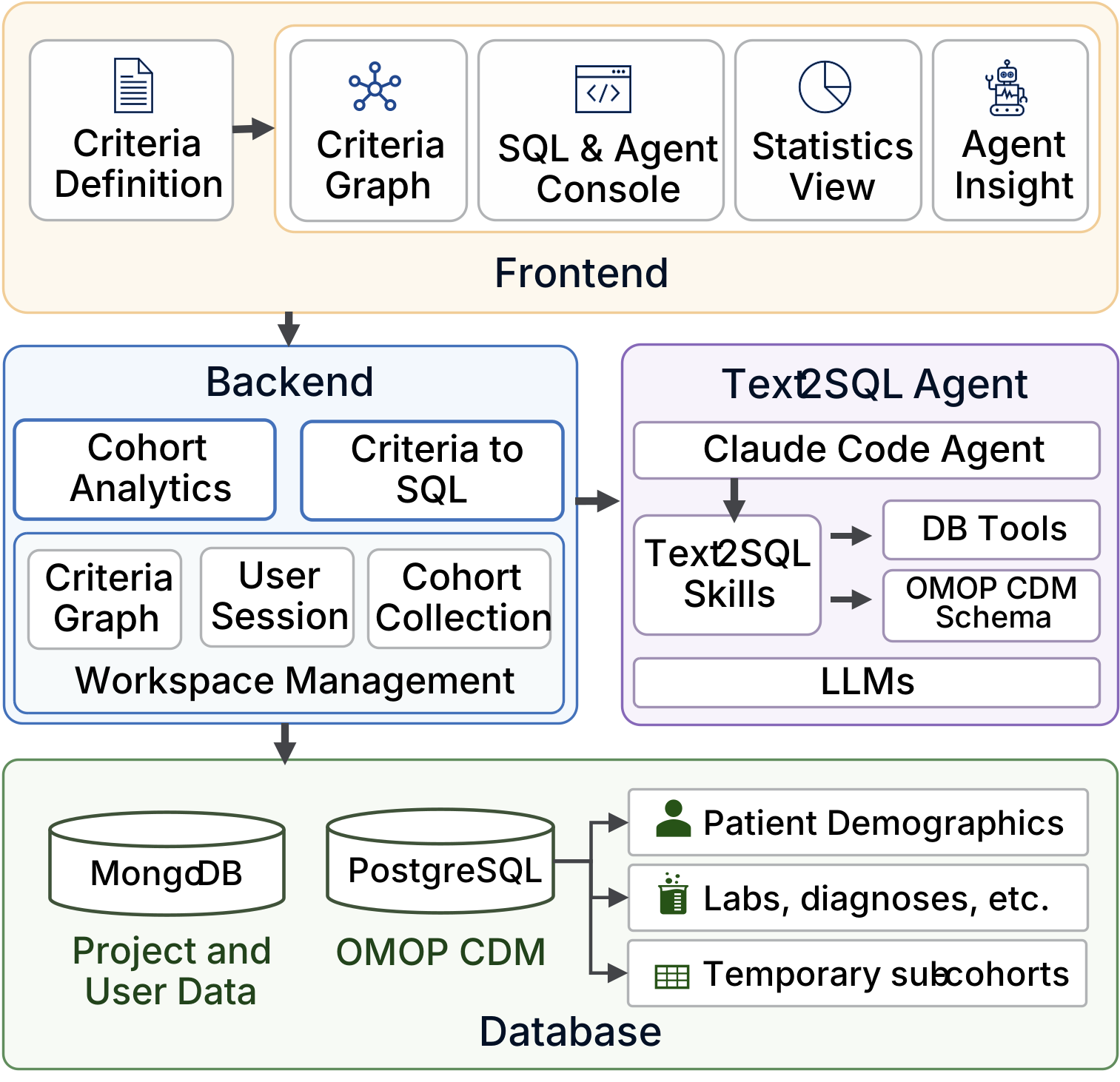
The user-facing visual workflow built with Vue.js, Vite, and Vue Flow. Exposes the Criteria Graph canvas, SQL Console, Cohort Analysis panel, and Agent Insights in a unified workspace.
A FastAPI service that mediates between the Frontend, the Text2SQL Agent, and the databases. Manages workspace state, criteria-to-SQL translation, and cohort analytics.
Built on a Claude Code Agent. Translates natural-language criterion descriptions into SQL predicates grounded to OMOP CDM concepts via vocabulary lookup and schema-aware generation.
MongoDB stores workspace and project state. PostgreSQL holds the OMOP CDM clinical data instance used for cohort execution and N-count computation.
Echo's interface is composed of a Criteria Graph (A), a Console for criterion-level SQL inspection and editing (B), and three Cohort Analysis views (C). Every view reacts to what happens on the Criteria Graph, keeping the visual authoring surface and the underlying query in shared state.
Rather than treating eligibility criteria as a flat checklist, Echo transforms the entire eligibility-criterion specification into an editable directed graph: criterion logic becomes nodes and dependency relations become directed edges. The graph flows top-to-bottom from a shared dataset root node, mirroring the researcher's mental model of sequential patient filtering. Each layer narrows the cohort and vertical position corresponds to filter-chain depth.
Rounded rectangles encoding an eligibility condition and its intermediate cohort count. Inclusion predicates receive green badges; exclusion predicates receive red badges, so researchers can verify that each criterion matches their clinical intent at a glance.
Rounded rectangles encoding AND, OR, and a quantified At-Least-N operator that captures cardinality constraints across multiple criteria.
Pill-shaped bars closing each subgraph with the final patient count and a slot-assignment control that designates the cohort as Cohort A, Cohort B, or unassigned.
From natural language to graph. A researcher types a free-form cohort description into the Criteria Agent chat. The agent extracts discrete clinical predicates, grounds each one to an OMOP concept, instantiates the corresponding nodes on the graph, and emits the SQL alongside them. Because the graph and its SQL always appear together, the translation from natural-language intent to executable query is immediately inspectable rather than hidden inside the agent.
Interactivity. Users can freely add nodes, draw edges, and drag nodes to reorganize the canvas. When a user modifies a criterion node, Echo localizes the change to that node's SQL predicate and recompiles only the affected subgraph. N counts propagate immediately through all downstream nodes and drop-off percentages update at each edge, giving researchers live feedback on the impact of every edit.
The Console exposes the technical details of the selected criterion node: its short name, original natural-language description, generated SQL predicate, execution preview, and activity history.
Text2SQL workflow. When a user enters a criterion, the Text2SQL Agent generates a short node label and translates the description into a SQL predicate grounded to OMOP CDM concepts. Executing the node returns intermediate cohort counts on the graph and preview rows in the Console.
Correction support. Users can directly edit the generated SQL predicate when the automated translation does not match their intent. Echo treats the edited SQL as the source of truth for the next execution and records the change in the activity log, making the translation from criterion text to executable query inspectable rather than hidden.
Cohort Analysis panel. The Cohort Analysis panel occupies the lower portion of the right-side column and is always visible regardless of node selection. It opens with a TARGET COHORTS checklist (one row per cohort on the graph), each showing a color swatch, cohort name, and final N count, which controls which cohorts participate in the three views below. All views update in response to graph edits and Execute events.
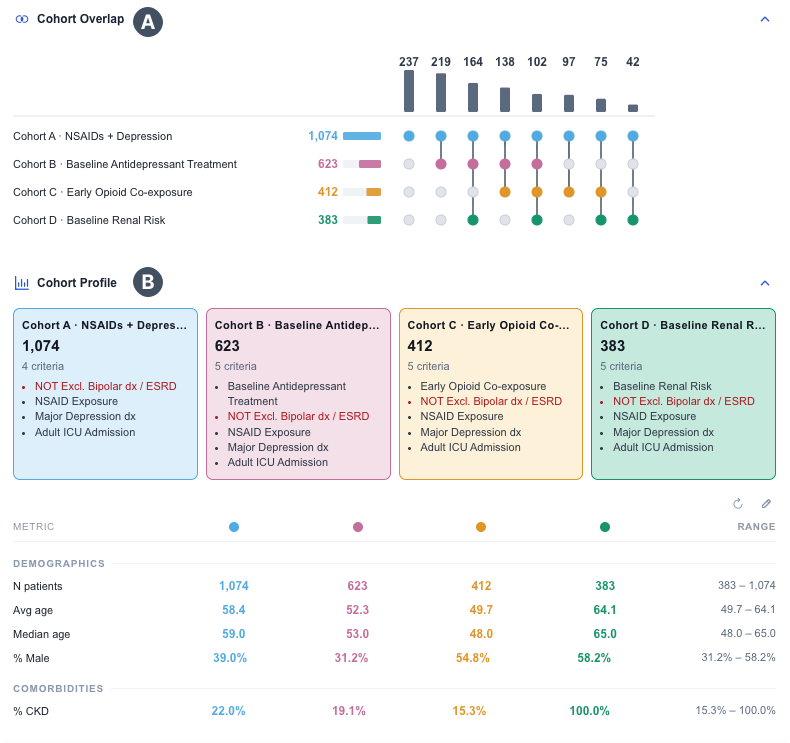
Once cohorts are constructed on the Criteria Graph, Echo provides three lightweight views that report basic descriptive statistics for at-a-glance comparison.
An UpSet plot shows the exclusive and shared patient subsets across selected cohorts, supporting comparison of the number of patients in every intersection proportionally. Researchers can see whether alternative definitions capture meaningfully different populations before committing to a definition, revealing unexpected overlap that would otherwise require separate queries to discover.
Each cohort is shown as a card with its final patient count and the inclusion and exclusion criteria contributed by its graph path. Exclusion criteria are rendered in red so the two predicate types are visually distinct. Below the cards, a metrics table reports basic descriptive statistics across selected cohorts, organized into Demographics (N patients, average age, percentage male) and Comorbidity, with a Range column summarizing cross-cohort spread for each metric.
LLM-generated observations across the selected cohorts, grounded in the computed statistics rather than external medical knowledge to limit hallucination risk. Insights refresh whenever the Criteria Graph is edited or re-executed.
The Criteria Graph is the central interactive surface, and every other view reacts to it. Selecting a node immediately highlights the corresponding entries in the Console and the Cohort Analysis views, so the user can see the SQL, the patient overlap, the demographic profile, and the AI-generated insights tied to that exact criterion. Editing a criterion or clicking Execute propagates in a single step: per-node N counts update on the graph, and the Cohort Overlap, Cohort Profile, and Insights panels re-render to reflect the new cohorts. Choosing which cohorts to compare is a graph-level interaction rather than a per-panel filter. A Compare selector toggles each cohort between active and parked, and all three analysis views switch in lockstep. The user steers the graph, and the rest of the interface follows.
We conducted an informal assessment with two domain experts, one clinical oncology faculty member and one data scientist with clinical trials experience, using Echo on a synthetic MIMIC-IV ICU dataset in OMOP CDM format. Each session lasted approximately 90 minutes and included a walkthrough of Echo, free exploration, and a semi-structured interview.
Participants successfully constructed and compared target cohorts. The Criteria Graph helped them understand the overall logic of a cohort definition, while visual edits felt low-friction. One participant went beyond the assigned task and created additional sub-cohorts to explore criterion combinations they had not planned in advance.
Seeing criteria as a graph made it easier to follow which filters applied first and how inclusion and exclusion logic was organized across the cohort definition.
Visual edits felt fast and recoverable. This encouraged researchers to derive additional sub-cohorts and explore alternatives beyond the assigned task.
Concept-code mappings still require human verification. Breaking complex eligibility criteria into individual nodes remains manual, and complex queries can be slow to execute.
Echo addresses two trends in U.S. clinical research that often pull against each other. AI-assisted cohort tools are getting faster at generating eligibility logic. At the same time, clinicians and researchers still need to inspect, modify, and trust that logic before they can use it.
Text-to-SQL and AI-assisted cohort tools can now generate eligibility logic faster than ever, but the output is typically a single opaque query that researchers cannot inspect, modify, or trust without rewriting from scratch. The Criteria Graph paradigm makes AI-generated cohort logic readable, editable, and auditable at the criterion level, so clinical researchers can adopt AI assistance without giving up control over the cohort definition.
Echo was accepted as an IEEE VIS 2026 poster, where I serve as co-equal first author. The work formalizes the Criteria Graph paradigm and the coordinated multi-view architecture so the design can be referenced and reused by other research groups working on AI-assisted clinical-research interfaces.
The design patterns introduced here are not specific to clinical-trial recruitment. The DAG-based eligibility representation, criterion-level SQL inspection, N-count propagation across the graph, and coordinated cohort-comparison views generalize to other AI-assisted research workflows where users need to inspect and refine AI-generated logic step by step.
Echo was built within biomedical AI research at the Yale School of Medicine, Department of Biomedical Informatics and Data Science. It is part of broader work on making AI-assisted biomedical systems (clinical NLP, EHR cohort tools, NIH Common Data Element navigation) interpretable and adoptable for U.S. researchers and clinicians.